

Ubuntu 21.04 Server add SSH banner at login

What is SSH?
The Secure Shell Protocol (SSH) is a cryptographic network protocol for operating network services securely over an unsecured network. Typical applications include remote command-line, login, and remote command execution, but any network service can be secured with SSH.
What is a SSH banner?
The SSH banner is used to add a warning to the connection, when a user connects to your SSH he well see a message like this one:

By default, no banner is showed, and the option is disabled. It is also useful to display a legal notice if required by local law.
How to add a ssh banner at login?
So the first thing that we have to do is to edit sshd_conf in /etc/ssh/
# How to edint sshd_config

sudo pico /etc/ssh/sshd_config
Find the following text
# no default banner path

# Banner none
Add after # Banner none on a new line:
Banner /etc/issue.net
Now you are going to have a file like this one
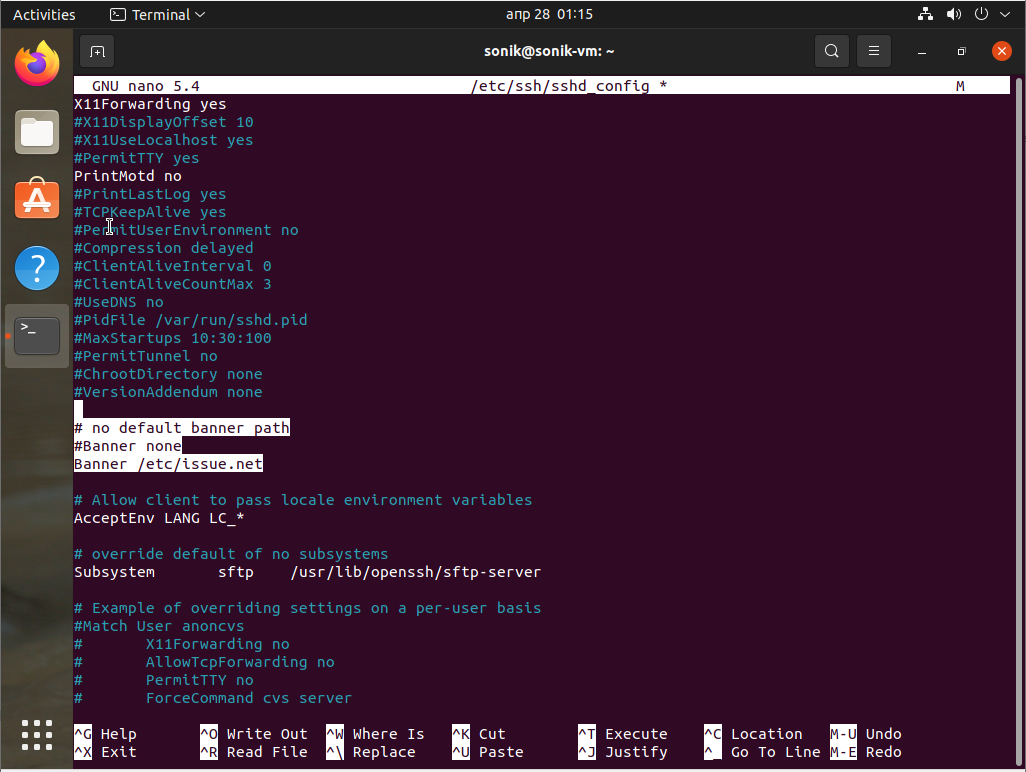
Now it's time to write what the banner is going to tell us, edit /etc/issue.net
# Edit /etc/issue.net

sudo pico /etc/issue.net
Now lets add some text:
# If you have entered here by accident please leave the ssh session
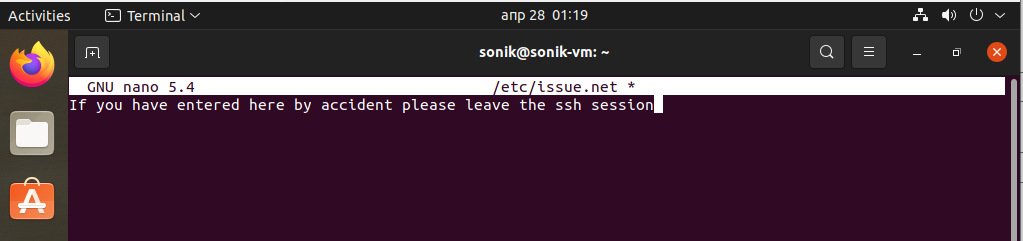
It's time to save the document and restart the sshd service
# restart sshd service

service sshd restart
Now on every new connection the ssh session will display the text like so:

Conclusion
In conclusion we can say that this is a good method to give some information to an entering person on the ssh session, but would you use it? What would you write?
We hope you enjoyed this article. if that is so please rate this page with the stars bellow and subscribe to our YouTube channel.